EntegrasyonlarIntegrations

Mevcut araçlarınızın yanında durur: bilet sistemi, kimlik sistemi, güvenlik olay platformuIt sits next to the tools you already run: ticketing, identity and your security event platform

SQL Change Guard bilet sisteminizin, kimlik sisteminizin ve SOC platformunuzun yerine geçmez. Kararı ve kanıtı üretir, kendi sistemlerinizle konuşur: bileti çalıştırma anında yeniden sorar, kurum hesabınızla giriş yaptırır, denetim olaylarını SOC toplayıcınıza akıtır. Bu sayfada yalnız üründe bugün çalışanlar yazılıdır. SQL Change Guard does not replace your ticketing system, your identity system or your SOC platform. It produces the decision and the evidence and talks to your own systems: it asks the ticket again at the moment of execution, signs users in with their corporate account and streams audit events to your SOC collector. This page describes only what works in the product today.

EntegrasyonIntegration Bağlandığı sistemlerConnects to Ne yaparWhat it does
Bilet sistemi (ITSM)Ticketing (ITSM) ServiceNow, Jira, genel RESTgeneric REST Kayıtta ve çalıştırma anında bileti sorar, kapalı ya da onaysız bilette durur, olayları bilete not olarak yazar.Checks the ticket at save and at execution, stops on a closed or unapproved ticket and writes events back to the ticket as notes.
Kurum hesabıyla giriş (SSO)Corporate sign in (SSO) OIDC: Entra ID, Keycloak, Okta
SAML 2.0: AD FS, Entra ID, Keycloak
Parola ürüne gelmez. Ürün rolü kimlik sağlayıcıdaki gruptan atanır.The password never reaches the product. The product role comes from the group in your identity provider.
Kurum dizini (LDAP) ve ikinci faktörDirectory (LDAP) and second factor Active Directory, genel LDAP dizinleristandard LDAP directories Parola dizinde doğrulanır, roller gruptan gelir, dizinde kapatılan hesap ürüne de giremez. Zaman tabanlı kodla ikinci faktör açılabilir.The password is checked in the directory, roles come from groups and an account disabled in the directory cannot sign in here either. A time based code can be enabled as a second factor.
SOC ve SIEMSOC and SIEM Syslog (TLS, TCP, UDP) ve dosyaand file
CEF, LEEF, RFC 5424, JSON
Denetim olaylarını TLS ya da TCP üzerinden akıtır; gönderilemeyen olay atlanmaz, bir sonraki turda yeniden denenir. Kapsamı daraltmak serbesttir, daralttığınızı SOC'tan gizlemek serbest değildir.Streams audit events over TLS or TCP; an event that cannot be delivered is not skipped and is retried on the next round. Narrowing the scope is allowed; hiding that you narrowed it from the SOC is not.

Bilet, kimlik ve dizin bağlantıları varsayılan olarak kapalı gelir; SIEM gönderimi ise uç adresi tanımlanmadan başlamaz. Yönetişim Kurulum Kontrolü ekranı her birinin durumunu gösterir. Açmak kurumun kararıdır. The ticketing, identity and directory connections ship switched off; SIEM delivery does not start until an endpoint address is defined. The Governance Setup Check screen shows the state of each. Turning them on is your decision.

Bilet sistemiTicketing

Bilet onaylandı. Peki çalışan iş o bilete mi bağlı?The ticket was approved. Is the work that runs tied to that ticket?

Değişiklik kurulu (CAB) bir bileti onaylar; ama biletin içinde çalışacak betik yoktur ve onaydan sonra kayıt kapatılmış ya da geri çekilmiş olabilir. Ürün bu boşluğu iki noktada kapatır.The change advisory board (CAB) approves a ticket, but the script that will run is not in it, and the record may have been closed or withdrawn after approval. The product closes that gap at two points.

1. Talep kaydedilirken1. When the request is saved

Girilen numara bilet sistemine sorulur. Kayıt yoksa, türü yanlışsa ya da kapanmışsa talep kaydedilmez. Kip üçtür: kapalı, uyar, engelle. Varsayılan engellemedir.The number is looked up in your ticketing system. If the record does not exist, is of the wrong type or is already closed, the request is not saved. There are three modes: off, warn and block. The default is block.

2. Çalıştırma anında2. At the moment of execution

Aynı bilet bir kez daha sorulur. Önbellek kullanılmaz, çünkü onay kuyruğa alındıktan sonra geri çekilmiş olabilir. Değişiklik kaydı çalıştırılabilir durumda değilse iş başlamaz. Talep ölmez: onaylı kalır ve kayıt uygun hale gelince yeniden çalıştırılır.The same ticket is asked again. No cache is used, because approval may have been withdrawn after the job was queued. If the change record is not in an executable state, the work does not start. The request does not die: it stays approved and runs again once the record is ready.

Her talep türü ITSM'de karşılığına bağlanırEach request type maps to its record in the ticketing system

Ürün içindeki talepRequest in the product ITSM'deki kayıtRecord in the ticketing system KuralRule
DeğişiklikChange Değişiklik kaydıChange record Var, doğru türde ve çalıştırılabilir durumda olmalı. Planlanan aralık zorunluluğu isteğe bağlıdır.Must exist, be of the right type and be in an executable state. Enforcing the planned window is optional.
Sorgu sonucu (veri çıkarma)Query result (data extraction) Hizmet talebiService request Var, doğru türde ve kapanmamış olmalı. Veri istemek bir değişiklik değildir, bu yüzden değişiklik kurulu onayı aranmaz.Must exist, be of the right type and not be closed. Asking for data is not a change, so no CAB approval is required.
Acil talepEmergency request Olay kaydıIncident record Acil değişikliğin onayı çoğu kurumda sonradan verilir, bu yüzden değişiklik kurulu onayı aranmaz. Kapanmış ya da bulunamayan değişiklik kaydı yine durdurur; olay numarasının denetimi ise varsayılan olarak uyarı kipindedir ve engellemeye alınabilir. Geçen her acil çalıştırma istisna olarak kayda yazılır.Emergency approval is usually given afterwards, so CAB approval is not required. A closed or missing change record still stops the work; the incident number check is in warn mode by default and can be set to block. Every emergency execution that passes is written down as an exception.
Geri almaRollback Kaynak değişikliğin kaydıThe source change's record Kapıdan muaftır: kaynak kayıt kapanmış olabilir ve geri almayı kilitlemek üretimdeki bozulmanın düzeltilmesini engellerdi. Muafiyet kayda yazılır.Exempt from the gate: the source record may already be closed, and locking a rollback would block the repair of a broken production system. The exemption is recorded.

Yazma yönü: ürünün yaptığı, bilet sisteminde görünürThe write direction: what the product does shows up in the ticket

Talep açıldığında, onaylandığında, reddedildiğinde, zamanlandığında, çalıştırıldığında ya da çalıştırma başarısız olduğunda ilgili bilete kısa bir not düşer (ServiceNow'da iş notu, Jira'da yorum). Not metni sabit ve sadedir: betik metni, sonuç verisi ve parola içermez. Bilet sistemine ulaşılamazsa not kaybolmaz; bir sonraki turda aynı yerden devam edilir. Uzun süre gönderilemeyen not varsa bu tek seferlik bir alarm olayı olarak SOC'a gider.When a request is opened, approved, rejected, scheduled, executed or fails, a short note is added to the ticket (a work note in ServiceNow, a comment in Jira). The note text is fixed and plain: it contains no script text, no result data and no password. If the ticketing system cannot be reached, the note is not lost; the next round resumes from the same place. A note that cannot be delivered for a long time raises a single alert event that goes to the SOC.

Bilet sistemi kapalı ya da ulaşılamaz olduğunda ne olurWhat happens when the ticketing system is off or unreachable

Denetçiye ne gösterirWhat it shows the auditor

Ürünün bilet sisteminde o an gördüğü kayıt (durum, tür, onay alanı) denetim izine olduğu gibi dondurulur. Bilet sistemindeki kayıt sonradan değişse bile "o gün ne görüldü" sorusunun cevabı kaybolmaz. Kurala uymayan bilet, doğrulanamayan kayıt, kapıda duran ya da kurul onayı aranmadan geçen çalıştırma ve gönderilemeyen notlar ayrı olay adlarıyla yazılır ve süzgeçten etkilenmeden SOC'a gider.The record the product saw at that moment (state, type, approval field) is frozen into the audit trail as it was. Even if the record in the ticketing system changes later, the answer to "what was seen that day" is not lost. A ticket that breaks the rule, a record that could not be verified, an execution stopped at the gate or passed without CAB approval, and notes that could not be delivered are written under their own event names and reach the SOC regardless of the filter.

Bağlayıcılar ve kurulumConnectors and setup

ServiceNow: Table API üzerinden değişiklik, olay ve hizmet talebi kayıtları. Jira: REST v2 ve v3; bulutta e-posta ve API anahtarı, veri merkezi kurulumunda kişisel erişim anahtarı. Genel REST: sorgu ve not adresleri şablon olarak tanımlanır, başka bir bilet sistemi için de kullanılabilir. Bağlantı ayarları uygulama ayar dosyasındadır, sırlar yalnız API sunucusunda durur, sertifika doğrulaması varsayılan olarak açıktır. Ayarlar > ITSM ekranında "Bağlantıyı test et" ile gerçek bir kayıt sorgulanır. Bağlayıcılar, bu üç sistemin gerçek yanıt biçimlerini taklit eden bir laboratuvar simülatörüyle uçtan uca sınandı; kurumunuzdaki gerçek örnekle ilk kurulumda birlikte doğrularız.ServiceNow: change, incident and service request records through the Table API. Jira: REST v2 and v3; email and API token in the cloud, a personal access token on a data center installation. Generic REST: the lookup and note addresses are defined as templates, so another ticketing system can be used too. Connection settings live in the application settings file, secrets stay on the API server only, and certificate validation is on by default. On the Settings > ITSM screen "Test connection" looks up a real record. The connectors were tested end to end against a lab simulator that imitates the real response shapes of these three systems; we verify them together with you against your own instance at first setup.

Kurum hesabıyla girişCorporate sign in

Parola ürüne gelmez, yetki gruptan gelirThe password never arrives here, the role comes from the group

Giriş ekranında "Kurum hesabıyla giriş yap" düğmesi çıkar. Kullanıcı parolasını ve ikinci adımını kimlik sağlayıcının kendi sayfasına yazar; ürün yalnızca imzalı cevabı doğrular.A "Sign in with your corporate account" button appears on the sign in screen. The user types the password and the second step on the identity provider's own page; the product only verifies the signed answer.

İki protokolTwo protocols

OpenID Connect (yetki kodu akışı, PKCE ile): Microsoft Entra ID, Keycloak, Okta. SAML 2.0 (HTTP-POST): AD FS, Microsoft Entra ID, Keycloak. Birden fazla sağlayıcı aynı anda tanımlanabilir; hatalı bir sağlayıcı kullanılmaz ve diğerlerini ya da yerel girişi etkilemez.OpenID Connect (authorization code flow with PKCE): Microsoft Entra ID, Keycloak, Okta. SAML 2.0 (HTTP-POST): AD FS, Microsoft Entra ID, Keycloak. More than one provider can be defined at once; a misconfigured provider is not used and does not affect the others or local sign in.

Rol gruptan atanırThe role is assigned from the group

Kimlik sağlayıcıdaki gruplar ürün rollerine eşlenir. Birden fazla grup eşleşirse en yüksek rol kazanır. Eşleşme yoksa kişi içeri girmez. Sistem yöneticisi rolü hiçbir eşlemeyle verilmez; bu rol her zaman ürün içinde bilinçli olarak atanır. Rolü elle yönetmek isteyen kurum eşlemeyi kapatabilir.Groups in your identity provider are mapped to product roles. If several groups match, the highest role wins. If none matches, the person does not get in. The system manager role is never granted by a mapping; it is always assigned deliberately inside the product. An organisation that prefers to manage roles by hand can turn the mapping off.

İşten ayrılan tek yerden kapanırA leaver is closed in one place

Kimlik sisteminde hesap kapandığında yeni oturum açılamaz. Ürün tarafında bir kullanıcının oturumları kapatıldığında elde kalan erişim jetonu da bir sonraki istekte reddedilir; oturumun sürenin dolmasını beklemesi gerekmez.When the account is closed in your identity system, no new session can be opened. When a user's sessions are closed inside the product, the access token they still hold is rejected on the next request; it does not have to wait for its expiry.

Acil durum girişi görünür kalırThe emergency sign in stays visible

Kurum hesabıyla giriş açıkken yerel parolayla girilirse bu ayrı bir olay olarak yazılır ve SOC'a alarm olarak gider. Denetçi "SSO varken yerel hesapla kim girdi" sorusunu tek satırda görür.If someone signs in with a local password while corporate sign in is on, it is written as a separate event and goes to the SOC as an alarm. The auditor sees "who signed in locally while SSO was on" on a single line.

Kurulum ve doğrulama durumuSetup and verification status

Sağlayıcılar uygulama ayar dosyasında tanımlanır; değişiklik için API yeniden başlatılır. İlk girişte hesabın otomatik açılması, oturum süresi ve kimlik sağlayıcıdan çıkış ayarlanabilir. Adresler ve SAML üst verisi kurulum ekranında kopyalanabilir biçimde görünür. OpenID Connect ve SAML, yerel bir Keycloak ile uçtan uca ve otomatik testlerle doğrulandı. Entra ID ve AD FS için kurulum adımları hazırdır ve aynı standart protokolleri kullanırlar; kurumunuzun kiracısıyla ilk kurulumda birlikte doğrularız.Providers are defined in the application settings file; the API is restarted to apply a change. Automatic account creation on first sign in, session length and sign out from the identity provider are configurable. Addresses and SAML metadata are shown on the setup screen in copyable form. OpenID Connect and SAML were verified end to end against a local Keycloak and with automated tests. Setup steps for Entra ID and AD FS are ready and they use the same standard protocols; we verify them with you against your own tenant at first setup.

Dizin ve ikinci faktörDirectory and second factor

Kurum dizininiz kimliğin kaynağı olarak kalırYour directory stays the source of identity

Kimlik sağlayıcınız yoksa ya da dizinle doğrudan konuşmak istiyorsanız Active Directory ve genel LDAP dizinleri desteklenir. Bağlantı, LDAPS ve StartTLS ile bir test dizinine karşı uçtan uca ve otomatik testlerle sınandı; Active Directory ile ilk kurulumda birlikte doğrularız.If you have no identity provider, or prefer to talk to the directory directly, Active Directory and standard LDAP directories are supported. The connection was tested end to end, with automated tests, against a test directory over LDAPS and StartTLS; we verify it with your Active Directory at first installation.

SOC ve SIEMSOC and SIEM

Kanıt iki ayrı yerde durur: üründe ve SOC'unuzdaThe evidence sits in two places: in the product and in your SOC

Denetim izi zaten yalnız ekleme yapılabilen bir defter tablosunda durur. SOC entegrasyonu bunun bir kopyasını kurumun kendi güvenlik sistemine, kurumun kendi biçiminde akıtır. Karar üründe verilir, kaydı güvenlik ekibiniz kendi platformunda da görür; ürünün kaydına güvenmek zorunda kalmaz.The audit trail already sits in a tamper evident record. The SOC integration streams a copy of it into your own security system, in your own format. The decision is made in the product and your security team also sees the record on its own platform; it does not have to take the product's record on trust.

Dört akış, iki mekanizmaFour streams, two mechanisms

Denetim (Audit) ve defter özeti (Anchor) akışları denetim kaydı tablosundan okunur ve "buraya kadar gönderdim" işaretiyle ilerler. Gönderim başarısız olursa işaret ilerlemez, bir sonraki tur aynı yerden devam eder: kayıp yoktur. (UDP bunun dışındadır: tek pakete sığmayan mesajı kaybeder ve kaybettiğini söylemez, bu yüzden TLS önerilir.) Uygulama günlüğü bellekteki bir kuyruktan gider ve kuyruk dolarsa en eski kayıt düşer: bu akışta kayıp mümkündür ve bilinçlidir. Nabız canlılık işaretidir.The audit (Audit) and ledger digest (Anchor) streams are read from the audit record table and advance with a "sent up to here" marker. If delivery fails the marker does not move and the next round resumes from the same place: nothing is lost. (UDP is the exception: it drops a message that does not fit one packet and does not say so, which is why TLS is recommended.) The application log goes through an in memory queue and, when the queue is full, the oldest record is dropped: loss is possible on this stream, and deliberately so. The heartbeat is a liveness signal.

Beş biçim, iki taşıyıcı: syslog ve dosyaFive formats, two transports: syslog and file

Biçim: RFC 5424 ile JSON (varsayılan), CEF (ArcSight), LEEF (QRadar), düz JSON ve RFC 5424 yapılandırılmış veri. Taşıyıcı: TLS üzerinden syslog (önerilen), TCP ve UDP; ayrıca toplayıcısı olmayan kurumlar için satır satır JSON dosyası. Birden fazla uç tanımlanabilir ve her biri kendi işaretini tutar. TLS'te sunucu sertifikasının parmak izi verilmişse tutmayan bağlantı reddedilir ve sessizce düz metne düşülmez.Formats: RFC 5424 with JSON (default), CEF (ArcSight), LEEF (QRadar), plain JSON and RFC 5424 structured data. Transports: syslog over TLS (recommended), TCP and UDP, plus a line by line JSON file for organisations with no collector. More than one endpoint can be defined and each keeps its own marker. On TLS, if a server certificate thumbprint is set, a connection that does not match is refused and the product never falls back silently to plain text.

Kapsamı daraltabilirsiniz, gizleyemezsinizYou can narrow the scope, you cannot hide it

SIEM lisansları hacme göre fiyatlanır, bu yüzden hangi akışların ve hangi ciddiyet eşiğinin gideceğini kurum seçer. Ama beş sınıf eşik ne olursa olsun gider: kontrolleri değiştiren ya da gevşeten işlemler (kimlik ve yetki değişiklikleri dahil), acil müdahaleler ile bilet sistemi istisnaları, reddedilen yetkiler ile başarısız girişler, defter özeti olayları (yayımlanan ya da üretilemeyen özet, geri yükleme) ve kanıt yazma sınırının bozulması ya da yeniden sağlanması. Süzgeçte yapılan her değişiklik SOC'a ayrı bir duyuru olarak da düşer.SIEM licences are priced by volume, so you choose which streams and which severity threshold go out. But five classes go out whatever the threshold: actions that change or loosen controls (identity and permission changes included), emergency actions and ticketing exceptions, denied permissions and failed sign ins, ledger digest events (a digest published or failed, a restore), and the evidence write boundary breaking or being restored. Every change to the filter also reaches the SOC as a separate announcement.

Kurum dışına ne çıkar, ne çıkmazWhat leaves, and what does not

Mesaja yalnız izin verilen alanlar girer; tanınmayan hiçbir alan gitmez. Hangi sunucu, hangi risk bandı, kaç ifade gibi olayı sınıflandırmaya yarayan bilgiler gider; hangi satırların döndüğü gitmez. Betik metni varsayılan olarak SOC'a gönderilmez, göndermek ayrı bir ayardır.Only permitted fields enter a message; any field that is not recognised does not go. Facts that help classify an event, such as which server, which risk band and how many statements, go out; which rows came back does not. Script text is not sent to the SOC by default; sending it is a separate setting.
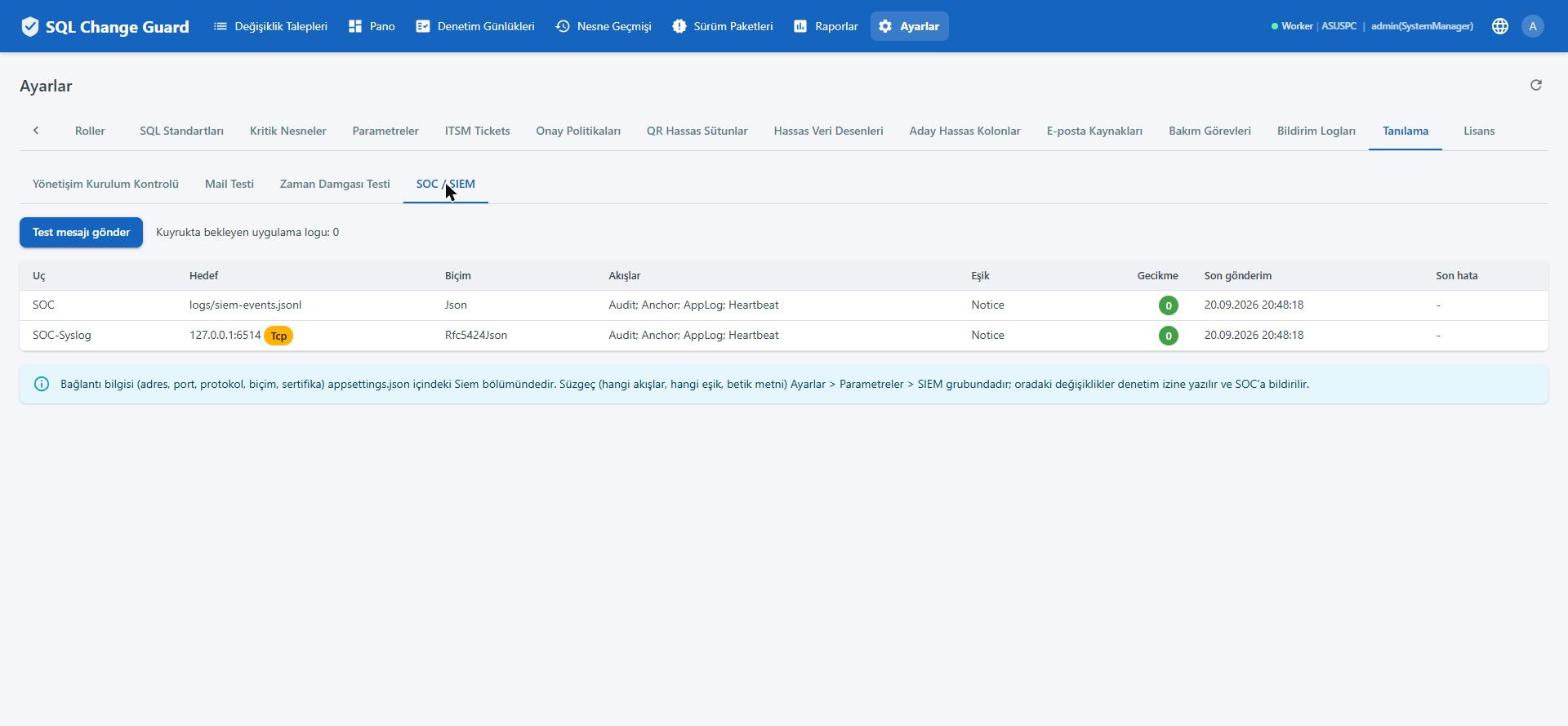

Tanılama, SOC ve SIEM ekranı: tanımlı uçlar, hedef, biçim, akışlar, eşik, gecikme ve son gönderim zamanı
Uçların durumuEndpoint health Her uç için hedef, biçim, akışlar, eşik, gecikme ve son gönderim zamanı. For each endpoint: target, format, streams, threshold, lag and time of the last delivery.
SOC toplayıcısına düşen iki syslog satırı: Siem.FilterChanged olayı, süzgecin hangi akışları kapattığını ve geri açtığını gösteriyor
Daraltmanın duyurusuThe announcement of narrowing Süzgeçten bir akış çıkarıldığında toplayıcıya Siem.FilterChanged olayı düşer: eski ve yeni değer birlikte. When a stream is removed from the filter, a Siem.FilterChanged event reaches the collector: old and new value together.

Kurulum notlarıSetup notes

KonuTopic Nasıl çalışırHow it works
Ayar yeriWhere it is configured Bağlantı bilgileri (adres, protokol, sırlar) uygulama ayar dosyasındadır. Süzgeç ve politika kararları Ayarlar ekranındaki parametrelerdedir; değiştirilince denetim izine yazılır ve ayar onayı açıksa dört göz onayından geçer.Connection details (address, protocol, secrets) live in the application settings file. Filter and policy decisions are parameters on the Settings screen; a change is written to the audit trail and, if settings approval is on, goes through four eyes approval.
Kurulum kontrolüSetup check Yönetişim Kurulum Kontrolü ekranı, her entegrasyonun açık mı kapalı mı olduğunu ve ayar hatalarını listeler. Hatalı bir ayar sessizce kullanılmaz.The Governance Setup Check screen lists whether each integration is on or off, and any configuration errors. A faulty setting is never used silently.
Kurulum süresiSetup time Adım adım kurulum ve entegrasyon ayarları Kurulum ve İşletim dokümanında anlatılır. Ön hazırlık listesi hangi hesapların, sertifikaların ve portların gerektiğini önceden söyler.Step by step setup and the integration settings are described in the Installation and Operations document. The prerequisites list says in advance which accounts, certificates and ports are needed.

Bugün olmayanlarWhat is not there today