SQL Change Guard does not replace your ticketing system, your identity system or your SOC platform. It produces the decision and the evidence and talks to your own systems: it asks the ticket again at the moment of execution, signs users in with their corporate account and streams audit events to your SOC collector. This page describes only what works in the product today.
| Integration | Connects to | What it does |
|---|---|---|
| Ticketing (ITSM) | ServiceNow, Jira, generic REST | Checks the ticket at save and at execution, stops on a closed or unapproved ticket and writes events back to the ticket as notes. |
| Corporate sign in (SSO) | OIDC: Entra ID, Keycloak, Okta SAML 2.0: AD FS, Entra ID, Keycloak |
The password never reaches the product. The product role comes from the group in your identity provider. |
| Directory (LDAP) and second factor | Active Directory, standard LDAP directories | The password is checked in the directory, roles come from groups and an account disabled in the directory cannot sign in here either. A time based code can be enabled as a second factor. |
| SOC and SIEM | Syslog (TLS, TCP, UDP) and file CEF, LEEF, RFC 5424, JSON |
Streams audit events over TLS or TCP; an event that cannot be delivered is not skipped and is retried on the next round. Narrowing the scope is allowed; hiding that you narrowed it from the SOC is not. |
The ticketing, identity and directory connections ship switched off; SIEM delivery does not start until an endpoint address is defined. The Governance Setup Check screen shows the state of each. Turning them on is your decision.
The change advisory board (CAB) approves a ticket, but the script that will run is not in it, and the record may have been closed or withdrawn after approval. The product closes that gap at two points.
The number is looked up in your ticketing system. If the record does not exist, is of the wrong type or is already closed, the request is not saved. There are three modes: off, warn and block. The default is block.
The same ticket is asked again. No cache is used, because approval may have been withdrawn after the job was queued. If the change record is not in an executable state, the work does not start. The request does not die: it stays approved and runs again once the record is ready.
| Request in the product | Record in the ticketing system | Rule |
|---|---|---|
| Change | Change record | Must exist, be of the right type and be in an executable state. Enforcing the planned window is optional. |
| Query result (data extraction) | Service request | Must exist, be of the right type and not be closed. Asking for data is not a change, so no CAB approval is required. |
| Emergency request | Incident record | Emergency approval is usually given afterwards, so CAB approval is not required. A closed or missing change record still stops the work; the incident number check is in warn mode by default and can be set to block. Every emergency execution that passes is written down as an exception. |
| Rollback | The source change's record | Exempt from the gate: the source record may already be closed, and locking a rollback would block the repair of a broken production system. The exemption is recorded. |
When a request is opened, approved, rejected, scheduled, executed or fails, a short note is added to the ticket (a work note in ServiceNow, a comment in Jira). The note text is fixed and plain: it contains no script text, no result data and no password. If the ticketing system cannot be reached, the note is not lost; the next round resumes from the same place. A note that cannot be delivered for a long time raises a single alert event that goes to the SOC.
The record the product saw at that moment (state, type, approval field) is frozen into the audit trail as it was. Even if the record in the ticketing system changes later, the answer to "what was seen that day" is not lost. A ticket that breaks the rule, a record that could not be verified, an execution stopped at the gate or passed without CAB approval, and notes that could not be delivered are written under their own event names and reach the SOC regardless of the filter.
ServiceNow: change, incident and service request records through the Table API. Jira: REST v2 and v3; email and API token in the cloud, a personal access token on a data center installation. Generic REST: the lookup and note addresses are defined as templates, so another ticketing system can be used too. Connection settings live in the application settings file, secrets stay on the API server only, and certificate validation is on by default. On the Settings > ITSM screen "Test connection" looks up a real record. The connectors were tested end to end against a lab simulator that imitates the real response shapes of these three systems; we verify them together with you against your own instance at first setup.
A "Sign in with your corporate account" button appears on the sign in screen. The user types the password and the second step on the identity provider's own page; the product only verifies the signed answer.
OpenID Connect (authorization code flow with PKCE): Microsoft Entra ID, Keycloak, Okta. SAML 2.0 (HTTP-POST): AD FS, Microsoft Entra ID, Keycloak. More than one provider can be defined at once; a misconfigured provider is not used and does not affect the others or local sign in.
Groups in your identity provider are mapped to product roles. If several groups match, the highest role wins. If none matches, the person does not get in. The system manager role is never granted by a mapping; it is always assigned deliberately inside the product. An organisation that prefers to manage roles by hand can turn the mapping off.
When the account is closed in your identity system, no new session can be opened. When a user's sessions are closed inside the product, the access token they still hold is rejected on the next request; it does not have to wait for its expiry.
If someone signs in with a local password while corporate sign in is on, it is written as a separate event and goes to the SOC as an alarm. The auditor sees "who signed in locally while SSO was on" on a single line.
Providers are defined in the application settings file; the API is restarted to apply a change. Automatic account creation on first sign in, session length and sign out from the identity provider are configurable. Addresses and SAML metadata are shown on the setup screen in copyable form. OpenID Connect and SAML were verified end to end against a local Keycloak and with automated tests. Setup steps for Entra ID and AD FS are ready and they use the same standard protocols; we verify them with you against your own tenant at first setup.
If you have no identity provider, or prefer to talk to the directory directly, Active Directory and standard LDAP directories are supported. The connection was tested end to end, with automated tests, against a test directory over LDAPS and StartTLS; we verify it with your Active Directory at first installation.
The audit trail already sits in a tamper evident record. The SOC integration streams a copy of it into your own security system, in your own format. The decision is made in the product and your security team also sees the record on its own platform; it does not have to take the product's record on trust.
The audit (Audit) and ledger digest (Anchor) streams are read from the audit record table and advance with a "sent up to here" marker. If delivery fails the marker does not move and the next round resumes from the same place: nothing is lost. (UDP is the exception: it drops a message that does not fit one packet and does not say so, which is why TLS is recommended.) The application log goes through an in memory queue and, when the queue is full, the oldest record is dropped: loss is possible on this stream, and deliberately so. The heartbeat is a liveness signal.
Formats: RFC 5424 with JSON (default), CEF (ArcSight), LEEF (QRadar), plain JSON and RFC 5424 structured data. Transports: syslog over TLS (recommended), TCP and UDP, plus a line by line JSON file for organisations with no collector. More than one endpoint can be defined and each keeps its own marker. On TLS, if a server certificate thumbprint is set, a connection that does not match is refused and the product never falls back silently to plain text.
SIEM licences are priced by volume, so you choose which streams and which severity threshold go out. But five classes go out whatever the threshold: actions that change or loosen controls (identity and permission changes included), emergency actions and ticketing exceptions, denied permissions and failed sign ins, ledger digest events (a digest published or failed, a restore), and the evidence write boundary breaking or being restored. Every change to the filter also reaches the SOC as a separate announcement.
Only permitted fields enter a message; any field that is not recognised does not go. Facts that help classify an event, such as which server, which risk band and how many statements, go out; which rows came back does not. Script text is not sent to the SOC by default; sending it is a separate setting.
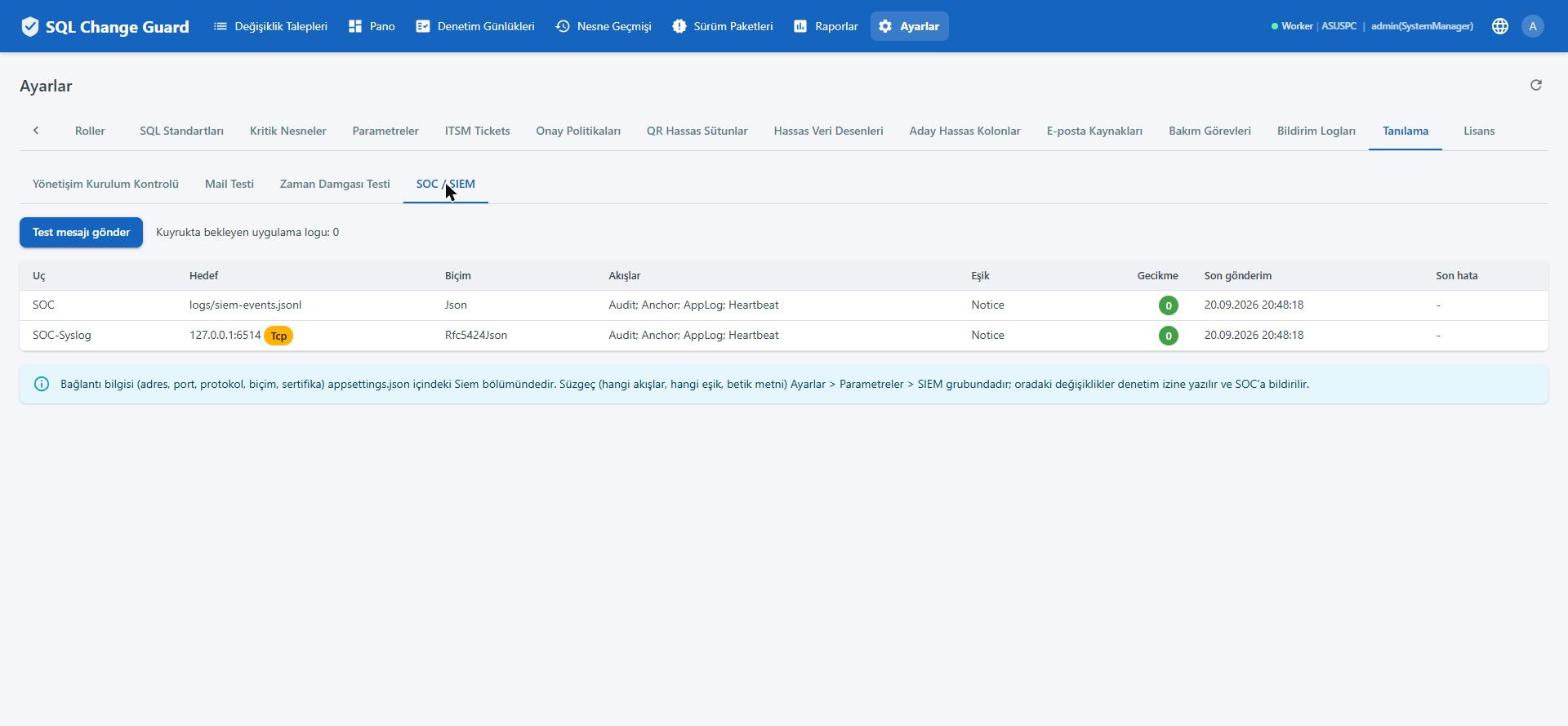
| Topic | How it works |
|---|---|
| Where it is configured | Connection details (address, protocol, secrets) live in the application settings file. Filter and policy decisions are parameters on the Settings screen; a change is written to the audit trail and, if settings approval is on, goes through four eyes approval. |
| Setup check | The Governance Setup Check screen lists whether each integration is on or off, and any configuration errors. A faulty setting is never used silently. |
| Setup time | Step by step setup and the integration settings are described in the Installation and Operations document. The prerequisites list says in advance which accounts, certificates and ports are needed. |
